
Google Gemini leads in free-sourced research. The Google plan page lists Deep Research on the free plan, and Microsoft retired consumer Deep Research starting August 18, 2026.
Microsoft Copilot leads on editing a workbook in place, at $9.99 a month against $19.99 for Gemini in Sheets.
Prices are dated November 13, 2026.
Table 1. Personal plans: price, research report, and spreadsheet assistant listed on each plan page (US prices, collected 2026-11-13)
Plan | Price (USD per month) | Research report | Spreadsheet assistant | Workbook route |
|---|---|---|---|---|
Microsoft 365 Pro | 99.99 | Researcher | Copilot in Excel | Edits the open workbook |
Google AI Ultra | 99.99 | Deep Research | Gemini in Sheets | Convert to Google Sheets first |
Microsoft 365 Premium | 19.99 | Researcher | Copilot in Excel | Edits the open workbook |
Google AI Pro | 19.99 | Deep Research | Gemini in Sheets | Convert to Google Sheets first |
Microsoft 365 Family | 12.99 | Not listed | Copilot in Excel | Edits the open workbook |
Microsoft 365 Personal | 9.99 | Not listed | Copilot in Excel | Edits the open workbook |
Google AI Plus | 4.99 | Deep Research | Not listed | Not listed |
Gemini free plan | 0.00 | Deep Research | Not listed | Not listed |
Not listed: the plan page does not name the feature. Bold: the lowest-priced plan that lists the feature. Google AI Ultra shows $99.99 as a starting price and $199.99 for a second level.
The Microsoft plan comparison shows Microsoft 365 Personal at $9.99 a month. Google AI Pro at $19.99 a month is the lowest Google plan that names Gemini in Sheets, which is $10.00 a month more.
The Gemini free plan carries Deep Research at $0.00.
Personal chat and office work are the scope for Microsoft Copilot and Google Gemini here. Readers who want the coding assistant can check GitHub Copilot pricing and AI credits.
Sources and collection date
LLM Waves Research collected these figures from Microsoft and Google plan, help, and pricing pages on November 13, 2026, and did not run either product.
Each figure was read from its source page that day, across 18 pages in all.
The methodology page holds the source list, and the raw data file at the end lists every URL.
Plan pages that list sourced research and spreadsheet work rank first here, and monthly price ranks second.
Four routes at their lowest listed prices set the baseline.
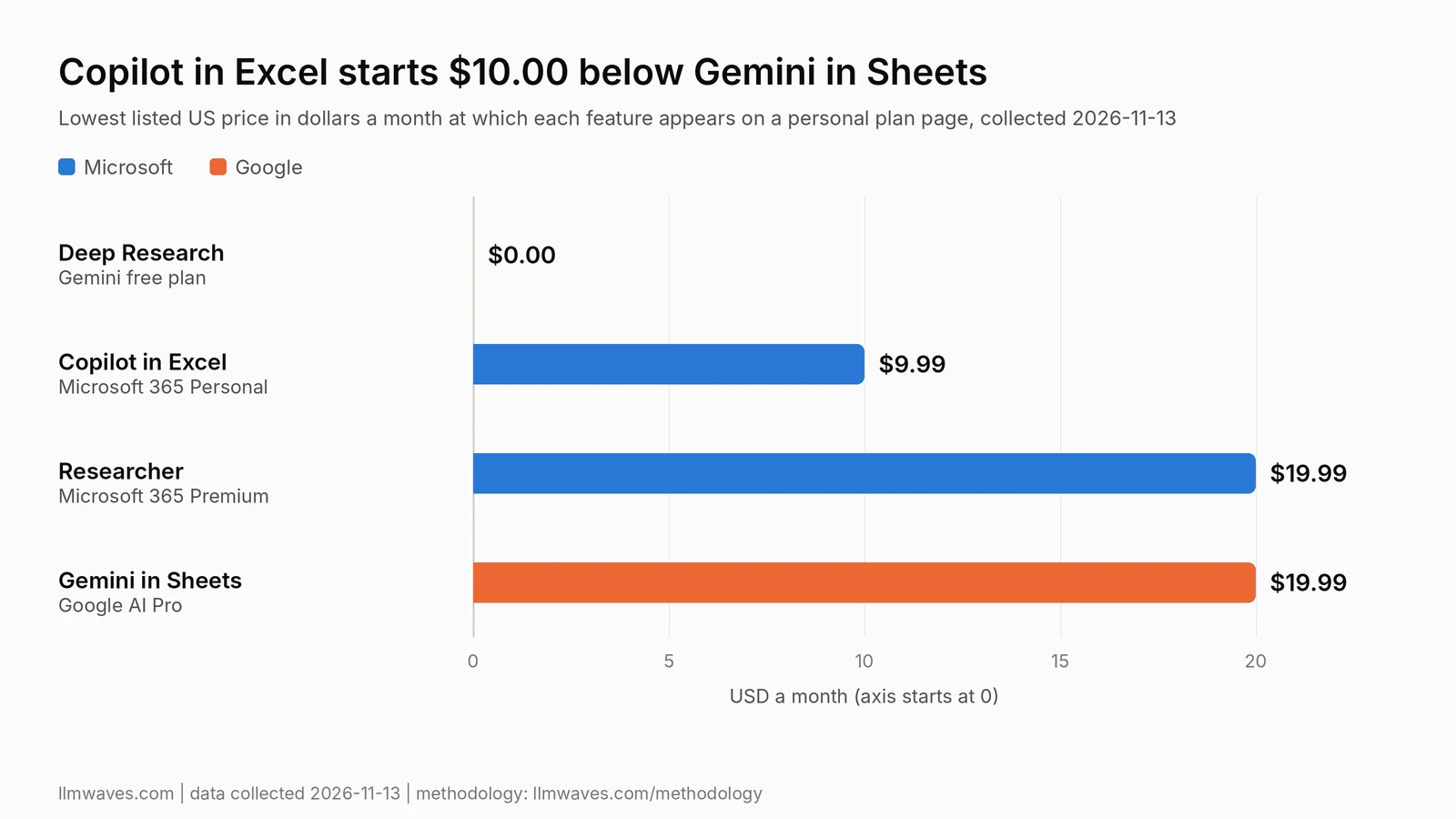
Deep Research costs $0.00, Copilot in Excel starts at $9.99 a month, and both Researcher and Gemini in Sheets start at $19.99 a month.
Gemini lists Deep Research on the free plan, and Microsoft lists Researcher on two personal plans
Google plans
The Google plan comparison page shows a checkmark for Deep Research with no plan and with Google AI Plus, Pro, and Ultra.
The page warns that Deep Research may be unavailable for people without a plan during periods of high demand. Google AI Plus gets 2x the standard limits.
Microsoft plans
Microsoft retired consumer Deep Research starting August 18, 2026, per the Microsoft retirement notice.
The notice names Researcher as the alternative. Personal and Family subscribers are not named for Researcher, and they can open earlier reports from chat history.
The Researcher help page names Microsoft 365 Premium and Pro subscribers, plus business and enterprise users with a Microsoft 365 Copilot add-on license. No free plan appears.
Readers who also weigh a search assistant can open Perplexity vs Gemini.
Copilot in Excel edits the open workbook, and Gemini in Sheets starts from a converted copy
Copilot in Excel
The Excel help page documents an editing mode where Copilot in Excel edits the workbook directly. Saved changes are visible to anyone with access to the file.
Editing needs Calculation Options set to Automatic, and files from a SharePoint site that requires check-out do not work on Windows or Mac.
The Microsoft plan comparison and the Microsoft 365 Pro product page both footnote that Copilot in Excel requires AutoSave.
Gemini in Sheets
The Gemini in Sheets help page names Google AI Pro and Ultra for personal accounts, and not Google AI Plus.
For work accounts, it names Business Standard, Business Plus, Enterprise Standard, and Enterprise Plus, and not Business Starter.
A second Google help article states that the feature works best with native Google Sheets files. It gives Save as Google Sheets from the File menu for an Excel file.
Plan coverage count
Copilot in Excel appears on four of four Microsoft 365 personal paid plans. The Excel help page names Personal, Family, and Premium, and the Pro product page names Pro.
A share-by-plan comparison makes the two lists comparable.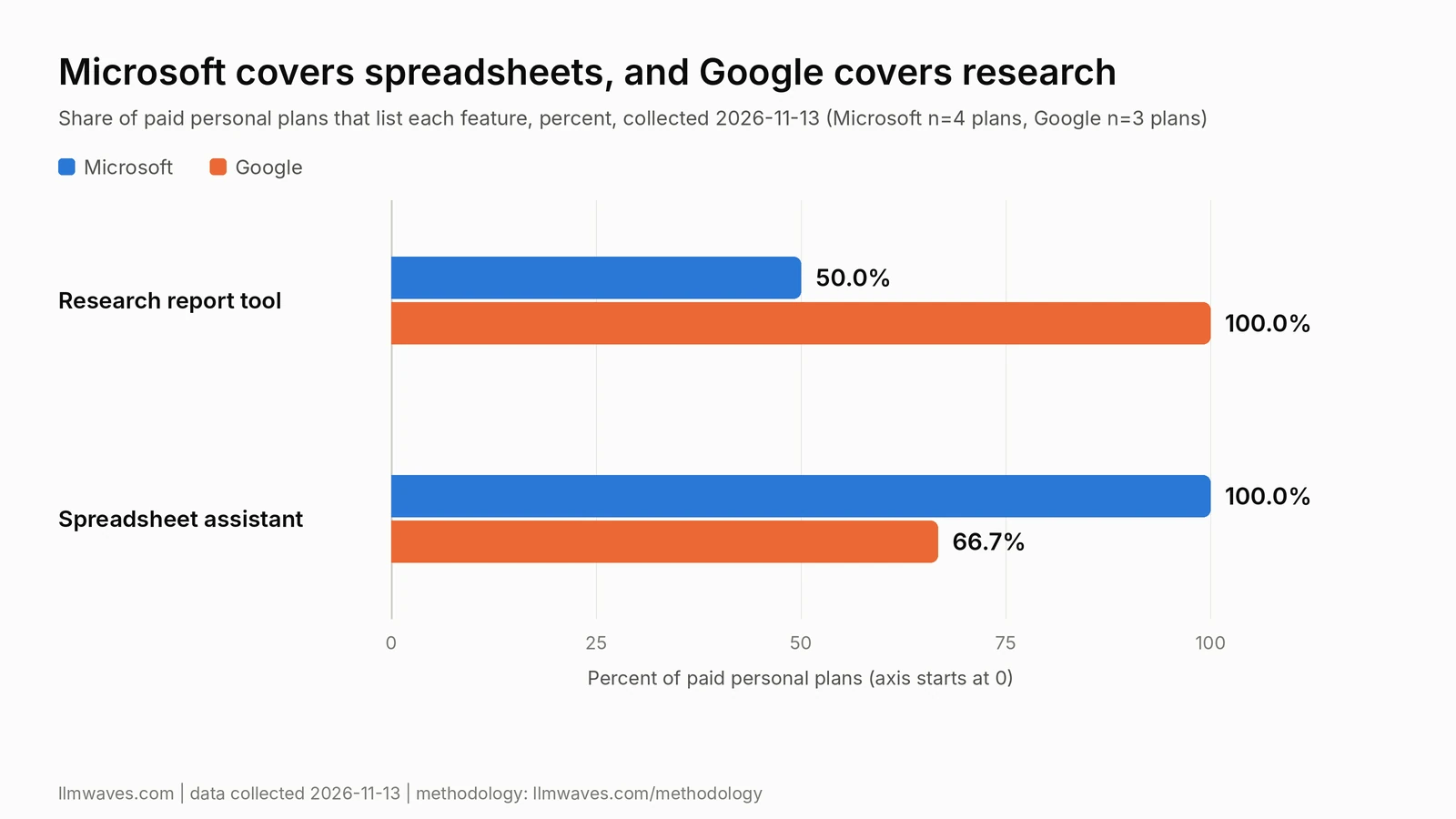
Microsoft lists Researcher on two of four paid plans and Copilot in Excel on four of four.
Google lists Deep Research on three of three paid plans and Gemini in Sheets on two of three.
Microsoft 365 Personal costs $120.00 less than Google AI Pro over 12 months of monthly billing
Microsoft 365 Personal costs $9.99 a month. Over 12 months of monthly billing, that is $119.88.
Google AI Pro costs $19.99 a month on the Google subscriptions page. Over 12 months of monthly billing, that is $239.88.
Google AI Pro costs $120.00 more than Microsoft 365 Personal over those 12 months.
Microsoft 365 Premium costs $19.99 a month. Over 12 months of monthly billing, that is $239.88, the same as Google AI Pro.
Microsoft 365 Personal costs $99.99 when paid for the whole year. That is $19.89 less than the $119.88 monthly total. The Google subscriptions page shows no yearly price.
Readers who compare paid assistants from three vendors can open Claude vs ChatGPT vs Gemini.
Twelve-month totals put the gap in dollars.
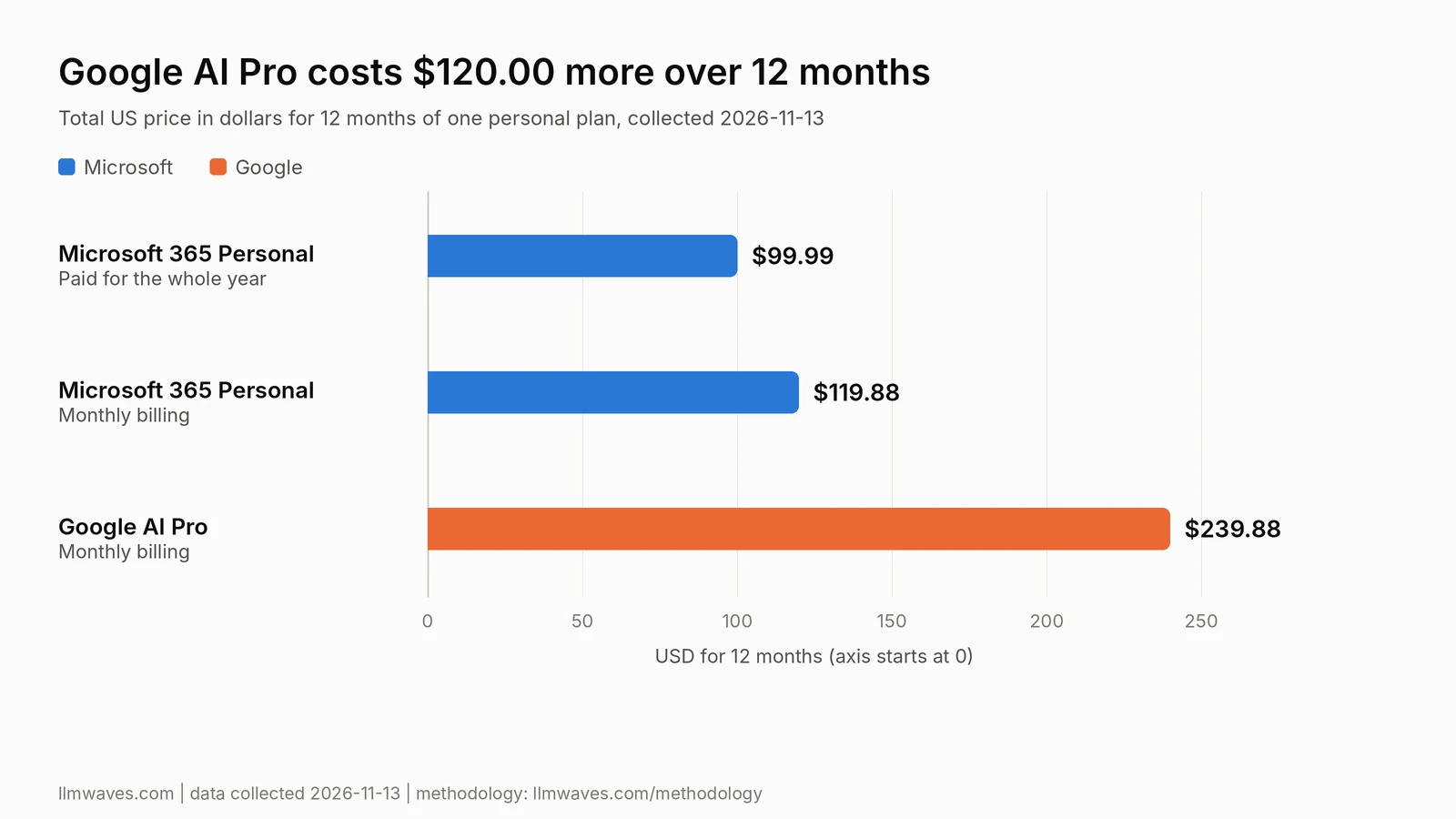
Google AI Pro totals $239.88 over 12 months of monthly billing, against $119.88 for Microsoft 365 Personal.
Work accounts add cost differently: Copilot Business adds $21.00 for each user, and Business Standard costs $14.00
Microsoft work accounts
The Excel help page names a Copilot Chat-eligible Microsoft 365 or Office 365 business or enterprise subscription as a route to Copilot in Excel.
The same page ties availability to the organization's tenant configuration.
The Microsoft Copilot Business page shows the add-on at $21.00 for each user, each month, when paid for the whole year.
An offer of $18.00 for each user, each month, covers the first year and runs from July 1, 2026 to December 31, 2026.
The monthly option costs $25.20 for each user, each month. Microsoft sells the add-on only to existing customers with an eligible Business plan.
Google Workspace accounts
The Google Workspace pricing page shows Business Starter at $7.00, Business Standard at $14.00, and Business Plus at $22.00 for each user, each month.
All three carry the Gemini app and Gemini in Gmail. Business Standard and Business Plus add Gemini in Docs and Sheets.
The page states monthly billing and a 16% saving with a 1-year commitment.
An introductory price runs from November 10, 2026 to February 10, 2027 under two sets of terms, so the figures here are regular prices.
Per-user prices for both work routes sit side by side, without the base Microsoft 365 Business plan.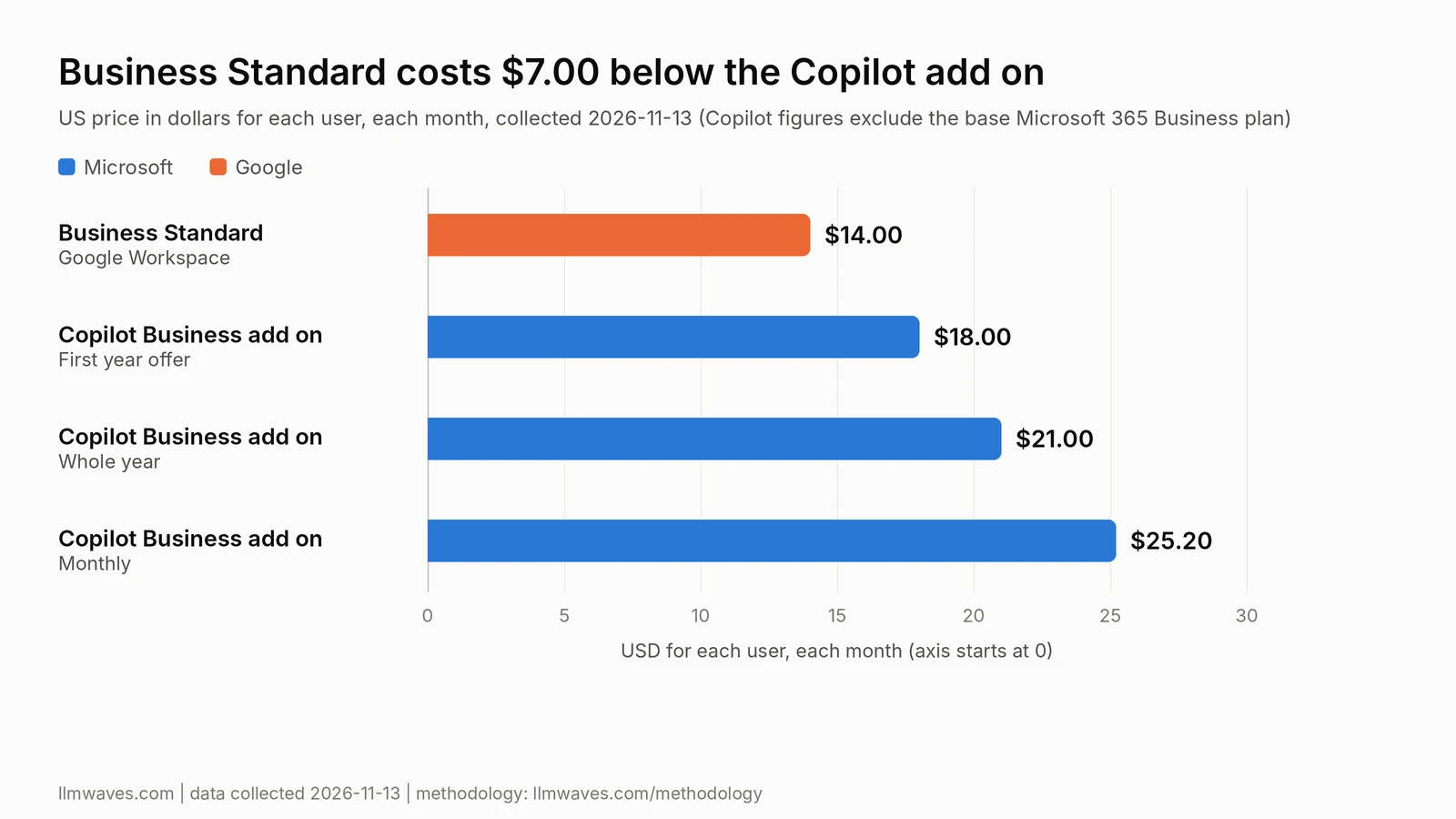
Business Standard costs $14.00 for each user, each month, and the Copilot Business add-on costs $21.00 before the base plan.
Chat upload and in-place editing are separate routes with separate plan lists
Table 2 keeps chat file analysis and native file editing in separate rows.
Table 2. Spreadsheet routes by type, grouped as chat file analysis first and native file editing second (collected 2026-11-13)
Route | Product | What the page documents | Where the result goes |
|---|---|---|---|
Chat file analysis | Gemini app upload | Up to 10 files per prompt, 100 MB each, excluding video. The page does not name .xlsx | A table can be exported to a new spreadsheet in Google Drive |
Chat file analysis | Copilot on personal Microsoft 365 plans | .xlsx, .xlsm and .xlsb workbooks stored in OneDrive | Not stated |
Native file editing | Copilot in Excel | Editing mode edits the workbook directly | The same workbook |
Native file editing | Gemini in Sheets | Works best with native Google Sheets files, with Save as Google Sheets for Excel files | The converted Google Sheet |
Not stated: the help page does not say where the result goes. Gemini documents 10 files per prompt at 100 MB each outside video, and Microsoft documents three workbook formats.
A Gmail attachment needs a file checklist before either assistant edits it
A manager receives a Gmail message with a macro-free .xlsx attached. The request is a month-over-month percentage column, a flag on every decline, and a workbook sent back as .xlsx.
One prompt covers both routes: add a month-over-month percentage column, flag each month that declines, and keep the original columns unchanged.
Checklist for Copilot in Excel
Account: Microsoft 365 Personal, Family, Premium or Pro, or a Copilot Chat eligible work plan.
Storage: the workbook saved to OneDrive with AutoSave on.
Setting: Calculation Options set to Automatic.
Format: .xlsx, and not a checked-out SharePoint file.
Result: the edits land in the same workbook.
Checklist for Gemini in Sheets
Account: Google AI Pro, Google AI Ultra, or Workspace Business Standard or higher.
Conversion: Save as Google Sheets from the File menu.
Export: The help page names no step back to .xlsx, so the exported file needs a check of its filename, formula results, and formatting against the starting file.
Result: the edits land in the converted copy.
The account that holds the file decides which privacy page applies
Four account types carry four different privacy statements.
Table 3. Privacy statements by account type, as each vendor page states them (collected 2026-11-13)
Account | What the page states | Source page |
|---|---|---|
Personal Copilot | A switch named Training on conversation activity controls training use. Conversation history is retained for 18 months. The page covers the older Copilot app | Microsoft Copilot privacy controls |
Personal Gemini | With Keep Activity on, a subset of chats is reviewed by human reviewers. With it off, chats are retained with the account for 72 hours | Gemini Apps privacy hub |
Copilot Chat at work | Prompts and responses are not used to train foundation models. Admins can view logged activity | Microsoft data protection page for Copilot Chat |
Gemini in Google Workspace | Customer data is not used for model training without prior permission. Content is not human-reviewed outside the domain without permission. Admins turn Gemini on or off | Google Workspace generative AI privacy hub |
Human review is stated only on the personal Gemini page. Both work account pages state that prompts or customer data are not used to train models, and Google adds without prior permission.
Which pick fits which account
Free personal account, sourced research report. Top pick: Gemini, because the Google plan page shows Deep Research at $0.00 and the Researcher help page names no free plan.
If Deep Research shows as unavailable during high demand, the pick fails, and Google AI Plus at $4.99 a month carries 2x the standard limits.
Personal account, edit an .xlsx in place. Top pick: Copilot in Excel on Microsoft 365 Personal at $9.99 a month.
Situational: Gemini in Sheets on Google AI Pro at $19.99 a month, for a workbook already converted to Google Sheets.
If the file cannot be saved to OneDrive with AutoSave on, the Copilot pick fails.
One personal plan for research and spreadsheets. Microsoft 365 Premium and Google AI Pro both cost $19.99 a month.
Situational: Premium, for workbooks that must stay .xlsx. Situational: Google AI Pro, for files kept in Google Drive.
Microsoft 365 business account. Situational: Copilot in Excel on a Copilot Chat-eligible subscription, when the tenant configuration allows it.
Insufficient data: Researcher at work, because the Researcher help page names the Microsoft 365 Copilot add-on license and no price.
Google Workspace account. Situational: Business Standard at $14.00 for each user, each month, for Gemini in Sheets.
Business Starter at $7.00 does not name Sheets, so the Starter pick fails for spreadsheet work.
What we did not measure
LLM Waves Research did not test the output of any route here. The month-over-month column, the decline flags, and the exported .xlsx were not produced or compared.
Upload limits and accepted formats for the free Copilot app were not collected, and neither were the usage limits behind Deep Research and Researcher.
This article did not run a latency test, a throughput test, or an output-quality benchmark against any model discussed.
Is Copilot or Gemini better?
Gemini is better for a free sourced research report, because Deep Research appears on the free plan.
Copilot is better for editing an .xlsx workbook in place, because Copilot in Excel edits the open workbook.
For every other task, the account type decides.
Does Copilot have Deep Research?
Microsoft retired consumer Deep Research starting August 18, 2026, and named Researcher as the alternative.
Researcher appears for Microsoft 365 Premium and Pro subscribers and for work users with a Microsoft 365 Copilot add-on license.
Can Gemini edit an Excel file?
Gemini in Sheets works on Google Sheets files, so an Excel file goes through Save as Google Sheets first. Personal accounts need Google AI Pro or Ultra.
Work accounts need Business Standard or higher. The Google article names no step back to .xlsx.
Can both analyze an uploaded spreadsheet?
Microsoft names .xlsx, .xlsm, and .xlsb workbooks stored in OneDrive for personal plans. Gemini takes up to 10 files per prompt, and its help page does not name .xlsx.
Which should I use if I have Gmail and Excel?
Copilot in Excel fits a reader who keeps the file as .xlsx, from $9.99 a month on Microsoft 365 Personal. Gemini in Sheets fits a reader who is willing to convert the workbook, from $19.99 a month on Google AI Pro.
Is Microsoft Copilot the same as GitHub Copilot?
The two are separate products. GitHub Copilot is the coding assistant, with its own pricing article on this site.
Plan lists change by account, so read your own page on the day you pay
Both vendors state that limits can change, and Microsoft ties work account availability to tenant configuration.
The raw data file below holds the source URL, and the figure read from it for every price and plan here.
Work account readers should start with the admin settings, and personal account readers with the plan page on the day of purchase.